Showing posts with label microsoft. Show all posts

Tutorial: Run Swift on Windows 10 the Easy Way (Using Linux Subsystem)

Posted: Wednesday, 7 September 2016

Running Apple's Swift programming language on Windows 10 is as simple as 1, 2 and 3.
  1. Setup the Linux Subsystem for Windows 10 Anniversary Edition
  2. Run sudo apt-get install build-essential (and optionally sudo apt-get install clang)
  3. Download, and Run swift!
  4. Note: for each of these links you can click or scroll down for more
Alternatively, the video below demonstrates the steps in motion...
https://www.youtube.com/embed/Z0PZc7WqPtE


And that's it.

Just note that both technologies are unstable as of September 2016
  • Swift is a fairly immature programming language
    • Due to the absence tools like a beautifier - though third-party tools such as Haaakon's SwiftFormat https://github.com/haaakon/SwiftFormat does the trick
    • Due to missing tangible desires such as bug reports & support from fellow Windows users of Swift (of which there is none)
    • And with breaking changes each major version of Swift (which might be why the Swift 1.0 code you found won't work on Swift 2.2 or even Swift 3.0 beta).
  • And the Windows Subsystem for Linux (WSL) is still in beta, with normally trivial tasks, such as interacting with the subsystem programmatically, almost impossible: https://github.com/Microsoft/BashOnWindows/issues/


Setting up WSL

To set up the Windows subsystem for Linux, an official guide can be followed here: https://msdn.microsoft.com/en-us/commandline/wsl/install_guide
Here's a summary:
  • Start Menu -> Search "Turn Windows features on or off"
  • Scroll Down to "Windows Subsystem for Linux (Beta)", and click the checkbox
  • Restart your computer, it should display a screen along the lines of "Configuring Windows", similar to a Windows Update
  • Once your computer has restarted, launch a normal Windows Command Prompt: Start Menu -> Search "Command Prompt" (or alternatively, cmd)
  • Type the command "bash", and press enter
  • Accept the T&C (or not, skipping this section and booting into Ubuntu is effectively the same)
  • Wait for the ~200MB Ubuntu Subsystem Image to Download, Extract and Install

And that's it! A mini non-Linux environment within Windows. Similar to how OS X does it, only 10 years behind.

Takes around 30 minutes.

Those Linux commands


With how administrative/root privileges work in WSL, you don't need "su/sudo" to run what are normally root commands (if you've skipped setting up the root user).
apt-get install build-essential should work on its own.
The build-essential package is required to run Swift. Without it, Swift would just fail in executing scripts. Unfortunately, this is quite a large package on Ubuntu, and even on Windows its no exception.
So run the command and wait it out, a tip to speed up the process of downloading packages is shown in the video.
Running apt-get install clang allows for Swift code compilation support in Windows via swiftc (swiftc with build-essentials alone does not work). Interestingly the resulting binary that swiftc compiles is a native Linux/Ubuntu ELF instead of a Windows exe.

Takes around 30 minutes.

Swift

Download Swift from here: https://swift.org/download/, note that you'd want the Ubuntu 14.04 version, if still offered.
Extract the archive just like you would on Ubuntu (or extract it using the Windows method, whichever you prefer), and run /usr/bin/swift through bash.

Takes around 10 minutes.


And that's it! Swift (the programming language) running on Windows 10 using the Windows Subsystem for Linux!

Although REPL doesn't really work, and you're not exactly working with native Windows goodness.


Caps/Scroll/Num Lock Toggler for Windows

Posted: Friday, 20 November 2015

Skip to download section

If you have a keyboard that does not have built-in Scroll Lock/Num Lock capabilities (such as the Microsoft Wireless Arc Keyboard - pictured below),

Then here’s a program that will toggle Scroll Lock/Caps Lock and Num Lock via software.

Download

http://static.extramaster.net/KeyboardLockTool.exe (413KB)

MD5: A7D6EF9C0A528C28198CEE4C907A8671
SHA-256: F90F46A618D70C1436DD9ABA38EA9F68B2CCCC354274E63FAF3B82B1344C8DA7

VirusTotal Scan:
https://www.virustotal.com/en/file/f90f46a618d70c1436dd9aba38ea9f68b2cccc354274e63faf3b82b1344c8da7/analysis/1447947391/
Works with Windows 10. A wired keyboard with Num lock/Scroll lock/Caps lock LEDs light up, indicating that this program is not hardware-dependent.

Demo

Tags:
windows force scroll lock
microsoft wireless keyboard scroll lock
microsoft arc keyboard scroll lock
trigger scroll lock without keyboard
trigger scroll lock

How to fix Microsoft Mobile Mouse Wheel Scrolling problems

Posted: Saturday, 27 June 2015

Table of Contents

Pre-solution

What didn't work

Dealing with the scrolling issues with the Microsoft Mobile 3500 Mouse turned out to be fairly simple, but


  • After plenty of messy registry hacks
    • (changing HCKU\Control Panel\Desktop\WheelScrollLinesHCKU\Control Panel\Mouse keys didn't work)
  • After plenty of time spent messing around with Control Panel
    • The basic "tutorials" only show you how to change the amount of lines scrolled at a time, but does not deal with the problem regarding the mouse scroll wheel sensitivity
  • After restarting/logging off a few times (logging off is apparently supposed to apply the registry changes that you've made)
  • And even after re-plugging the nano-transceiver device,


Nothing seemed to work to fix the delayed/slow scrolling with the Microsoft Mouse...

Fixing Proxy/Loading Issues with the Windows 8 App Store

Posted: Monday, 6 April 2015

This is the Windows Store app. Or, at least it would be if it worked. For now, it's just a splash screen...

Well, if would still be a splash screen if it wasn't for the fact that after a long wait, an error message appears.

The one I got first was:

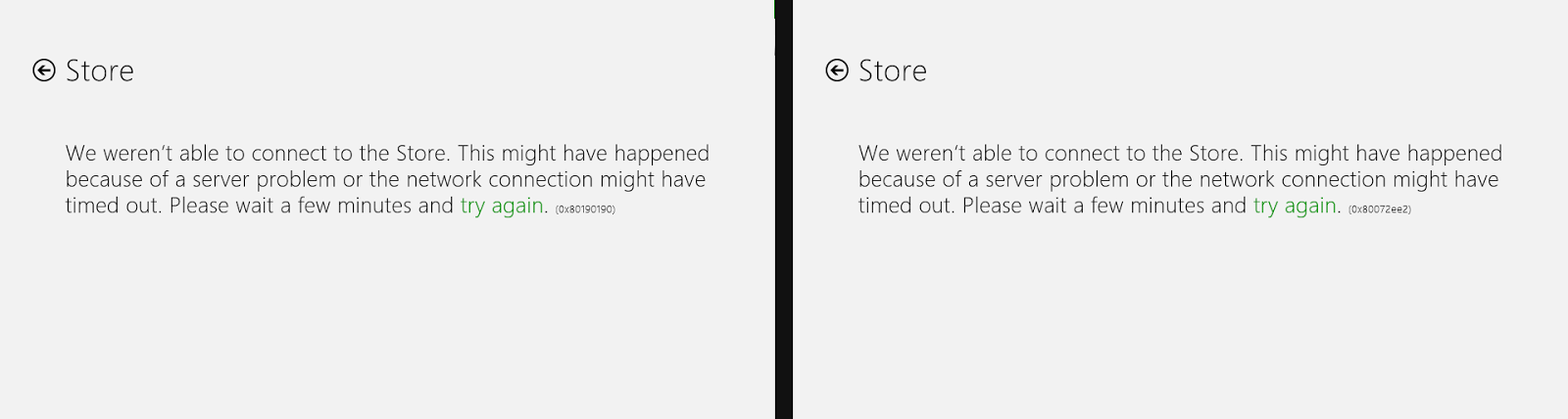
We weren't able to connect to the Store. This might have happened because of a server problem or the network connection might have timed out. Please wait a few minutes and try again. (0x80072ee2)

The next attempt in opening the store app resulted in another error:

We weren't able to connect to the Store. This might have happened because of a server problem or the network connection might have timed out. Please wait a few minutes and try again. (0x80190190)

Note how, in both cases, the error code was different...

So if you're currently encountering an error message with the same error codes, then you're in luck, since there is a fix! If the error code and problem is similar (but not exactly the same) then in any case just have a read through and see if your problem gets fixed.


Advanced Query Syntax (AQS) is not powerful enough!

Posted: Tuesday, 19 August 2014

Windows 7 came with a nifty feature called AQS which allowed users to search files and folders based upon rules and expressions.
This functionality was extended to Windows 8 and Windows 8.1, where the syntax and concept have remained intact.
Compared to regular expressions, AQS have yet to realise its "Advanced" claim, and should really fashion itself as the "Basic Query Syntax (BQS)".
Consider this scenario. I have a list of archives that I want to search through on my computer. These archives have a specific naming structure, 01-01-01 Archive.rar, 02-01-01 Archive.rar, 03-01-01 Archive.rar... Basically following the pattern of "DD-MM-YY Name.rar"
With "AQS", you're allowed to use the AND and OR operators, where to achieve searching the said files, you could hypothetically do something like: (0 or 1 or 2 or 3 or 4 or 5 or 6 or 7 or 8 or 9) and (0 or 1 or 2 or 3 or 4 or 5 or 6 or 7 or 8 or 9) * type:.rar

Well.. This worked in Windows 7. But, since Windows 8.1 is the trend now, I updated my computer and found out that it no longer worked.

The question to be asked. Is why is it so complicated to search numbers in the first place?
  • (0-9) and (0-9) * type:.rar
  • [0-9] and [0-9] * type:.rar
  • title:(0-9) and (0-9) * type:.rar
  • title:[0-9] and [0-9] * type:.rar
  • (0-9)(0-9) * type:.rar
  • [0-9][0-9] * type:.rar
  • (0-100) * type:.rar
  • [0-100] * type:.rar
  • title:(0-100) * type:.rar
  • title:[0-100] * type:.rar
All do not work...

With regular expressions, the following works fine:

However, the same regular expression fails completely in Windows 8.1...

The best solution that I could come up to solve my problem was to use the following AQS query: ("00" OR "01" OR "02" OR "03" OR "04" OR "05" OR "06" OR "07" OR "08" OR "09" OR "10" OR "11" OR "12" OR "13" OR "14" OR "15" OR "16" OR "17" OR "18" OR "19" OR "20" OR "21" OR "22" OR "23" OR "24" OR "25" OR "26" OR "27" OR "28" OR "29" OR "30" OR "31")

Though, I guess when it comes down to it, this is just proof that the "Advanced Query Syntax" format is simply not powerful enough.

Value of type '1-dimensional array of Byte' cannot be converted to 'Byte'. / Decoding a base64 string to bytes in VB.net

Posted: Tuesday, 5 August 2014

With VB.net, typically trivial errors are easy to overlook, which complicates the process of software development.

As the title of this post suggests, "Value of type '1-dimensional array of Byte' cannot be converted to 'Byte'." can be caused when you're attempting to use a function that returns a quote unquote "Byte"

This error is quite irritating because, when searched on StackOverflow, it has already been answered!

VB Value of type String cannot be converted to 1 dimensional array of Byte

With decoding base64 to bytes in VB.net, you can use the following function:

Convert.FromBase64String(_string_input_)

... where the error becomes evident

The solution to the "Value of type '1-dimensional array of Byte' cannot be converted to 'Byte'." error is quite simple.
Just remember to dim the variable of where you are trying to push the resulting bytes to as a byte array type, aka
Dim variable As Byte()
This works as when you're defining the Byte type, you're only really defining a single byte, not an array of bytes. Think of it as defining a string as a character, where the array of bytes (
As Byte()
) is the equivalent to an array of characters (hence, being represented else-wise as a string)

Downloaded File Completer

Posted: Monday, 21 July 2014

If you've ever used Google Chrome (which, as of 2014, means that you're in the majority of users), then you may have gotten a bright red text mocking you, claiming "Unknown Network Error" besides it.


Upon investigation, usually, something incomprehensible usually manifests itself, for example, the download stopped at 99% without any explanation, leaving behind a corrupted file.

Now, if you've ever been in a situation where you've been downloading that critical file that really needed to be downloaded, or the 99% represents hundreds of megabytes - even gigabytes of data, and it's that one missing bit that would warrant the entire file to be re-downloaded (since the checksum in zip files are something out of this world), then the "Downloaded File Completer" will help patch up the file and run as good as new.
Now, this tool works fine in any web browser, be it Firefox or Google Chrome, but since I primarily use Chrome myself, the tool has only really been tested it with a download that Chrome branded "Unknown Network Error", 
As such, if you have a file on your computer with the file extension ".crdownload", and the title looks something along the lines of "Unconfirmed [random number].crdownload", then locate the original URL of the corrupted file, and run it through this tool to repair it! 
Download: downloadPartial_.exe (77.0 KB / 78848 bytes)
MD5: A8663DB0631CFD860B817F742EBBF01E
SHA256: 55C88EBD8EC0A6FF83DCD994007E4CC37677119FAB8F7E5E63BE9A9FA9D67CB1
VirusTotal: https://www.virustotal.com/en/file/55c88ebd8ec0a6ff83dcd994007e4cc37677119fab8f7e5e63be9a9fa9d67cb1/analysis/1405860045/