Showing posts with label tutorial. Show all posts

Tutorial: Run Swift on Windows 10 the Easy Way (Using Linux Subsystem)

Posted: Wednesday, 7 September 2016

Running Apple's Swift programming language on Windows 10 is as simple as 1, 2 and 3.
  1. Setup the Linux Subsystem for Windows 10 Anniversary Edition
  2. Run sudo apt-get install build-essential (and optionally sudo apt-get install clang)
  3. Download, and Run swift!
  4. Note: for each of these links you can click or scroll down for more
Alternatively, the video below demonstrates the steps in motion...
https://www.youtube.com/embed/Z0PZc7WqPtE


And that's it.

Just note that both technologies are unstable as of September 2016
  • Swift is a fairly immature programming language
    • Due to the absence tools like a beautifier - though third-party tools such as Haaakon's SwiftFormat https://github.com/haaakon/SwiftFormat does the trick
    • Due to missing tangible desires such as bug reports & support from fellow Windows users of Swift (of which there is none)
    • And with breaking changes each major version of Swift (which might be why the Swift 1.0 code you found won't work on Swift 2.2 or even Swift 3.0 beta).
  • And the Windows Subsystem for Linux (WSL) is still in beta, with normally trivial tasks, such as interacting with the subsystem programmatically, almost impossible: https://github.com/Microsoft/BashOnWindows/issues/


Setting up WSL

To set up the Windows subsystem for Linux, an official guide can be followed here: https://msdn.microsoft.com/en-us/commandline/wsl/install_guide
Here's a summary:
  • Start Menu -> Search "Turn Windows features on or off"
  • Scroll Down to "Windows Subsystem for Linux (Beta)", and click the checkbox
  • Restart your computer, it should display a screen along the lines of "Configuring Windows", similar to a Windows Update
  • Once your computer has restarted, launch a normal Windows Command Prompt: Start Menu -> Search "Command Prompt" (or alternatively, cmd)
  • Type the command "bash", and press enter
  • Accept the T&C (or not, skipping this section and booting into Ubuntu is effectively the same)
  • Wait for the ~200MB Ubuntu Subsystem Image to Download, Extract and Install

And that's it! A mini non-Linux environment within Windows. Similar to how OS X does it, only 10 years behind.

Takes around 30 minutes.

Those Linux commands


With how administrative/root privileges work in WSL, you don't need "su/sudo" to run what are normally root commands (if you've skipped setting up the root user).
apt-get install build-essential should work on its own.
The build-essential package is required to run Swift. Without it, Swift would just fail in executing scripts. Unfortunately, this is quite a large package on Ubuntu, and even on Windows its no exception.
So run the command and wait it out, a tip to speed up the process of downloading packages is shown in the video.
Running apt-get install clang allows for Swift code compilation support in Windows via swiftc (swiftc with build-essentials alone does not work). Interestingly the resulting binary that swiftc compiles is a native Linux/Ubuntu ELF instead of a Windows exe.

Takes around 30 minutes.

Swift

Download Swift from here: https://swift.org/download/, note that you'd want the Ubuntu 14.04 version, if still offered.
Extract the archive just like you would on Ubuntu (or extract it using the Windows method, whichever you prefer), and run /usr/bin/swift through bash.

Takes around 10 minutes.


And that's it! Swift (the programming language) running on Windows 10 using the Windows Subsystem for Linux!

Although REPL doesn't really work, and you're not exactly working with native Windows goodness.


Playing MIDI tracks from an Arduino

Posted: Thursday, 29 October 2015

Link: https://www.extramaster.net/tools/midiToArduino/

Table of Contents (TOC)


^ TOC

So, you just learnt how to control a buzzer using an Arduino, but you want more then just simple beeps and hums - you want to assert your dominance over the sound-waves to show-off how well you can control the buzzer.

Cynical? Well there's no denying that it's a sentiment that we all share once we learn something new, but hey, if you've managed to acquire and get an Arduino working, then that's quite far an accomplishment.

A quick search of "music buzzer arduino" should point you to the right direction, but no-one has the time to individually hand-code and map the midi-tones to the frequency values that the Arduino's Tone function requires, especially if you're working with a long MIDI track.

The solution?

https://www.extramaster.net/tools/midiToArduino/

Circuitry

^ TOC

Wiring the Buzzer is trivial, just place the buzzer on two strips (on a breadboard), connect one strip to Pin 11 on your Arduino, and the other strip to the Ground.

Demo

^ TOC
https://www.youtube.com/watch?v=B1oHQzp1P3w
https://www.youtube.com/watch?v=4FDFpycApP4

Note that this also works with Raspberry Pis.
https://www.youtube.com/watch?v=HOisQF-JaS0


Steps/Instructions

^ TOC
  1. Visit: https://www.extramaster.net/tools/midiToArduino/
  2. Upload a midi file
  3. Choose the track that you want to export
  4. Copy the resulting code to a new Arduino sketch

Sample Exported Arduino Code

^ TOC

Didn't get the midi file to work with the web app? No worries, here are some sample code generated by the web-app

Midi: Fleuron-128 - Heaven - Song: Shaun Frank & KSHMR - Heaven (feat. Delaney Jane)

Midi: Antergy - DB15 - Song: Atmozfears - DB15

Midi: Kevin Fishburne - Terra's Theme - Song: Final Fantasy VI - Terra's Theme

https://www.extramaster.net/tools/midiToArduino/

Final Notes

^ TOC Oh, and by the way, it appears that you can leave the Piezo buzzer running on loop for an extensive amount of time (24 hours+), so if you want to play a midi indefinitely, you can use an Arduino to do so.

Unfortunately, you can only have one tone running at a time, so if your midi track has multiple keys being played simultaneously, expect some wacky results. (here - try this: http://www.forelise.com/midi - "Track 2: Acoustic Grand Piano - Piano - Fr Elise")
If you attempt some protothreads hack, then expect only one Piezo buzzer to work (at a time). But if you're game, and want to give using protothreads a try:


https://www.extramaster.net/tools/midiToArduino/

Fixing Proxy/Loading Issues with the Windows 8 App Store

Posted: Monday, 6 April 2015

This is the Windows Store app. Or, at least it would be if it worked. For now, it's just a splash screen...

Well, if would still be a splash screen if it wasn't for the fact that after a long wait, an error message appears.

The one I got first was:

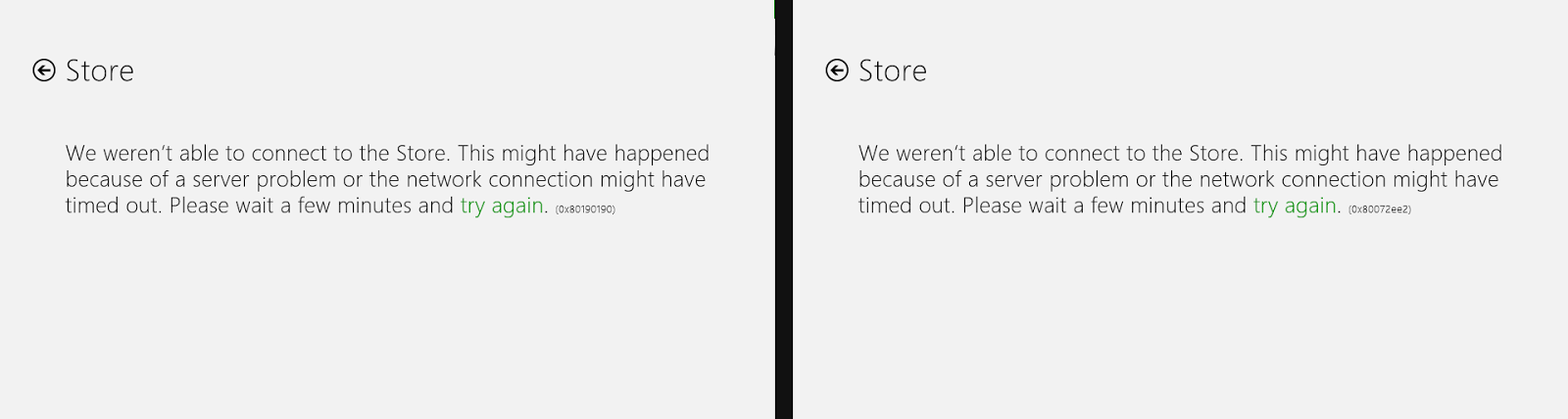
We weren't able to connect to the Store. This might have happened because of a server problem or the network connection might have timed out. Please wait a few minutes and try again. (0x80072ee2)

The next attempt in opening the store app resulted in another error:

We weren't able to connect to the Store. This might have happened because of a server problem or the network connection might have timed out. Please wait a few minutes and try again. (0x80190190)

Note how, in both cases, the error code was different...

So if you're currently encountering an error message with the same error codes, then you're in luck, since there is a fix! If the error code and problem is similar (but not exactly the same) then in any case just have a read through and see if your problem gets fixed.


Creating a static server in Go for Google App Engine

Posted: Saturday, 3 May 2014

Fork me on GitHub
Admittedly, fighting through the jungles of a new programming language will always be a challenge, and although new programming languages attempt to be as easy-to-understand and usable as possible, unless you're using a product like Visual Studio - where "programming" consists of drag and drop, double click and a few lines of code - it's not going to be easy.

Google recently announced the inclusion of Go into their Google App Engine service, but porting code from one language to another will be an uphill battle. Particularly porting Python code to Go. Would that even be possible?
Both programming languages are fundamentally different, and follow different paradigms, but both can perform the same task of serving data online.

Since Go is so different to Python, it's best to start from the very beginning.

One of the basic necessities of all web servers is a static server.